Family kitchen
Family meal planner
Put meals into a weekly plan, see what every meal costs, and keep the food shop inside your budget.
See how it worksPublish a menu page customers can order from, get an email for every order, and see what each one earns.
For caterers, cafés, takeaways and home kitchens who want customers to order without phone calls and messages.
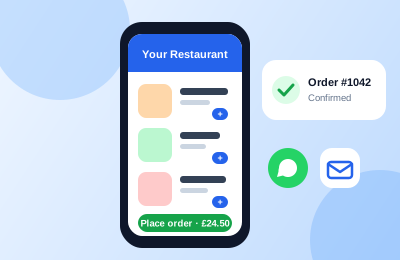
Your menus, with photos and prices, at a page of your own that you can share anywhere.
Switch on collection, delivery or both, and set a delivery fee, a minimum order and how long you need.
You and your customer both get an email, and WhatsApp messages too if you connect your own WhatsApp Business number.
Online orders land in your Orders like any other, costed from your recipes.
These are real screens from CostBridge, using the sample data every free trial starts with.
Open Restaurant in the Sales menu. Add your name, choose your page address, say a few words about your food and add a banner photo.
Pick which menus go on the page, then switch on Take online orders. Choose collection, delivery or both, and set a minimum order, how long orders take and where the order emails go.
Customers pay when they receive their order, so there is no card machine or payment set-up.
Press Publish and your page is live. Copy the link for social media, your Google Business Profile, a QR code or an email, or paste the embed code into your own website.
They see your menus with photos, tags and prices, add dishes to a basket and check out for collection or delivery.
Each order appears in Online Orders with the customer's details. Mark it complete or cancel it. It is also in Orders, where you can see what it cost you and what you made.
Your free trial starts with sample ingredients, recipes and prices, so you can see take orders from your own page working in minutes. No credit card needed.
Included in Starter, Pro and Business. The free Starter trial includes it.
No. They order on your page and pay when they receive their order, by collection or delivery.
Yes. Publishing gives you a link to share and an embed code to paste into your website.
You get an email for every order, to the address you choose. You can add WhatsApp messages too, from your own WhatsApp Business number.
Starter, Pro and Business, and the free Starter trial. The Family plan does not include it.
Every feature works with the same ingredients, recipes and prices.
Put meals into a weekly plan, see what every meal costs, and keep the food shop inside your budget.
See how it worksCost each recipe from your ingredient prices, and see the food cost and profit on every dish and menu.
See how it worksBuild a shopping list with a running total, record what you actually pay, and spot price rises before they catch you out.
See how it worksHome-style recipes with the cost of every serving shown, a how-to-prepare method and an Ask AI helper. Add any recipe to your weekly plan.
Browse the recipesJoin CostBridge today and start your free 14-day trial. No credit card required.